Get the full transcript of any YouTube video — searchable and ready for your AI.
Paste any YouTube URL and get an accurate, timestamped transcript in seconds. Search it, quote it, export it, or feed it into Claude, ChatGPT, and any AI tool you use.
30 million minutes transcribed by 50,000+ users


Real Summify transcripts
See what 8,200+ transcribed YouTube videos look like.
Live transcripts and summaries from across business, science, podcasts, interviews, and more. Click any to open the real Summify deep-dive — full transcript, key insights, entities, Q&A — in a new tab.
 10h 11mScience
NASA’s Artemis II Crew Flies Around the Moon (Official Broadcast)
 22mPodcast
Your Body Language May Shape Who You Are | Amy Cuddy | TED
 21mEducation
These are the asteroids to worry about
 2h 24mHowto & Style
Dr. Gabor Maté — Trauma, Addiction, Ayahuasca, and More
 42mNews & Politics
Ben Shapiro talks about Israel vs Hamas and why he would never support Biden over Trump
 35mSports
Is Bulking REALLY Dead? (ft. Dr Eric Helms)
 16mNonprofits & Activism
The psychology of self-motivation | Scott Geller | TEDxVirginiaTech
 25mGaming
This is Why Games like Baldur's Gate 3 Are So Rare...
 55mEducation
The World's Most Important Machine
YouTube’s captions are unusable.
YouTube auto-captions exist. You can scroll through them in the panel. But you can’t search them properly. You can’t copy a clean version. You can’t share them. And you can’t feed them into an AI to actually do something with the content. So you end up watching at 1.5x, pausing every 30 seconds to take notes, transcribing the bits you need by hand. Or you give up and just move on — missing the quote, the data point, the framework you came for.
Paste the link. Get the transcript.
Paste any YouTube URL. Summify pulls the transcript — accurate, timestamped, in 130+ languages — in seconds. Search it. Quote it. Save it to a pod and feed it into Claude, ChatGPT, or any AI you use. With citations back to the exact moment in the video.
How it works
Works with podcasts, lectures, interviews, tutorials, documentaries — any public YouTube video.
Paste any YouTube URL
Drop any public YouTube link into Summify. Podcast, lecture, tutorial, interview, documentary. The transcript is extracted automatically — no manual work, no browser extension.
Get the full timestamped transcript
The complete transcript appears in seconds, with timestamps on every paragraph. Click any timestamp to jump to that moment in the video. Auto-detects the source language and supports 130+ languages.
Search, copy, export, or feed it to your AI
Search the transcript for any word or phrase. Copy the full text. Export as PDF. Or save it to a Summify pod and reference it from Claude, ChatGPT, or any AI tool you use — with citations back to the video timestamp.
Why Summify
Transcripts in seconds
Any YouTube video — transcribed and ready in seconds, even hours-long content.
Fully searchable
Find any quote, name, or phrase across your entire transcript library.
Clickable timestamps
Every paragraph timestamped. Click to jump straight to that moment in the video.
130+ languages
Auto-detected from the captions. Source language preserved or translated.
AI chat on every transcript
Ask grounded questions about the video — retrieval over the actual transcript.
Export anywhere
Copy, PDF, plain text, or shareable link. Your transcript, your format.
Saved to your library
Every transcript stored permanently and searchable across all your content.
Works with any AI
Save to a Summify pod and use the transcript in Claude, ChatGPT, or any MCP-compatible AI.
Try it on the next video you need to quote.
Your first deep dive is free, no card needed.
Every transcript becomes part of your knowledge.
A transcript on its own is text. A transcript inside a Summify pod is knowledge your AI can use. Save any transcript to a pod — your client’s interviews, a series of conference talks, every episode of a podcast — and your pod becomes a searchable knowledge library your AI can quote from.
Works with the AI tools you already use.
Save any transcript to a Summify pod and connect it to Claude, ChatGPT, Claude Code, Cursor, Windsurf, or any AI that speaks MCP. Same transcript. Every chat. Every device. Ask "what did the speaker say about pricing?" and get the answer with a citation back to the original timestamp.
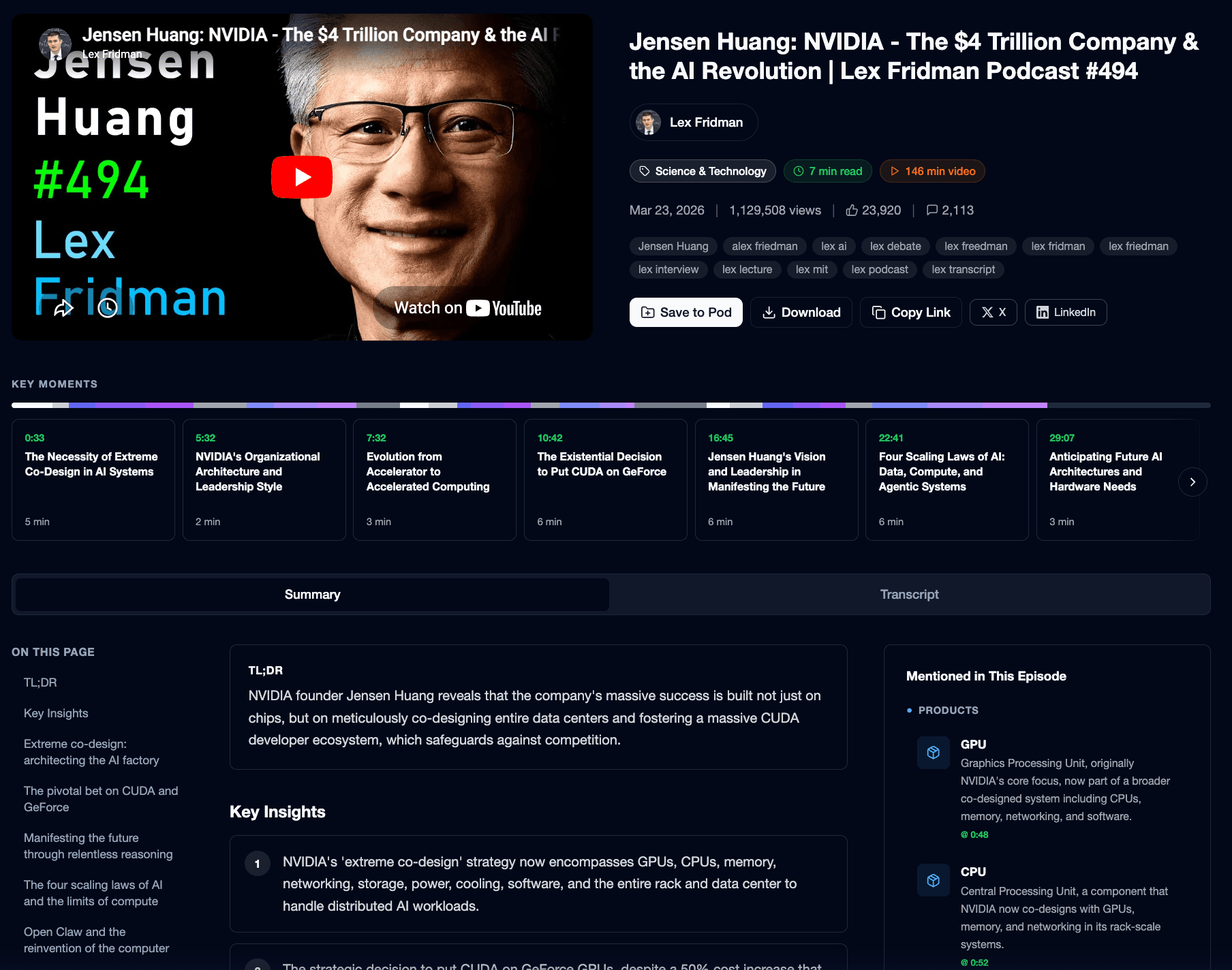
Not just transcripts. Browseable.
Every transcribed video opens into a full structured page: the transcript itself, plus timestamped key insights, extracted entities (books, people, companies mentioned), Q&A summaries, and a clean searchable view. You get the video as text and as a usable knowledge artefact.
Built for people who work with what’s in the video.
Researchers transcribing interviews, talks, and conference recordings for citation. Journalists pulling quotes and references from long-form videos. Students working with lecture recordings — searchable transcripts for revision. Content creators repurposing podcasts and talks into written content. Investors and founders archiving founder calls and earnings calls as searchable text. Legal and compliance teams building searchable archives of recorded testimony.
Frequently Asked Questions
More from Summify
Stop scrolling captions. Get the transcript.
Your first deep dive is free, no card needed.